 Appause
Pause first.
Then decide.
Before an app you picked opens, Appause adds a few seconds of cooldown. Then you choose: continue, or go home.
Free to use. Android 8.0 and later.
The button downloads the APK directly from GitHub. Lanzou mirror and download details

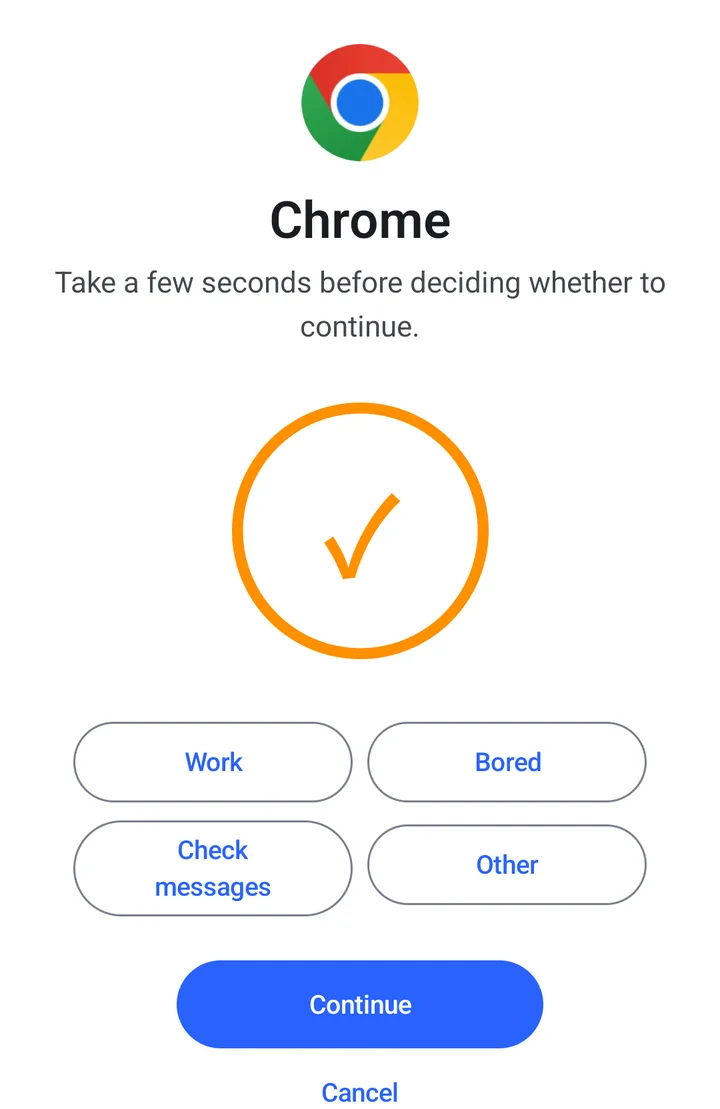
- Open an app you picked
- Wait out a short cooldown, and name a reason if you like
- Continue, or go home
Open the app, wait a few seconds, then continue or go home.
This demo waits 5 seconds; in the app, new groups start at 10.
Example app is in a group. Tap here to try
Example app
Take a few seconds before deciding whether to continue.
Set up in three steps
Download the APK from GitHub or the Lanzou mirror, then follow the install prompts.
-
Download and allow the install
Tap a download button, open the APK, then follow Android's install prompts.
-
Open Appause and turn on permissions
Follow the home screen prompts to set up permissions and background settings. See the next section for details.
-
Create a group
Pick the apps you want a cooldown on and set its length. Interception starts working from here.
To update later, install the new APK over the old one. Do not uninstall first: uninstalling deletes your groups and statistics. Full steps are in the install guide.

Which permissions to turn on
Follow the home screen prompts, including battery and background settings.
Required
- Accessibility service
- Identifies the current app and shows the pause screen. It does not read screen text or chats. Pausing needs this permission.
Recommended for reliable operation
- Battery optimization set to Unrestricted
- Choose Unrestricted or No restrictions to reduce interruptions from battery-saving settings.
- Autostart
- If your phone has this switch, turn it on to help Appause keep working after a restart or background cleanup.
- Usage access
- Recommended to confirm the current app and reduce unwanted pauses when switching apps.
When needed
- Display over other apps
- Not needed day to day. Turn it on as a fallback only if your phone does not show the pause screen.
- Notifications
- The ongoing status notification on Android 13 and later. Interception works without it.
No network in daily use. Appause connects only when you start the trial, redeem a code or send feedback. Groups, cooldown settings and statistics stay on this phone and are deleted when you uninstall. Details are in the privacy policy.
Your record
Each time a pause ends, Appause notes whether you continued or cancelled, for you to look back on.
- Completed
- After the cooldown, tap Continue to enter the app. This counts as one completion.
- Avoided
- You tapped Cancel on the pause screen and went home.
- Reasons
- The reason you picked when continuing is saved too. The free version keeps 365 days of history.
- Temporary Pass
- After the cooldown, choose a Temporary Pass for the current app for 5, 15 or 30 minutes. Pauses resume when it expires. This option is shown by default and can be hidden in Settings.

Free to use
Try Pro for 7 days, then request a free lifetime code. The trial helps us gather feedback and keep improving it.
Included from the start
- Interception, cooldown, pause screen and statistics, with no time or usage limit
- 1 group
- Cooldowns from 1 to 60 seconds, the same limit as Pro
- 365 days of statistics
- A diagnostic snapshot with feedback, sent only if you choose
Pro adds
- Unlimited groups
- Re-remind: a second nudge while you stay in the app
- Your own pause text
- Your own open reasons
- Start the 7-day trial on the app's Pro screen. Each device gets one.
- When the trial ends, the four Pro features switch off. Your groups and statistics stay.
- Tap Request lifetime Pro code on the Appause Pro screen and send the pre-filled email. Redeem the code on the same screen. One code works on up to 3 devices.
Check it in the source
Browse the code, report a problem, or help improve Appause.
- MIT license
- The code is open source under the MIT license. You can read, use and modify it.
- No screen content is read
- Appause identifies the current app without reading screen text or chats.
- The activation server keeps none of your usage data
- When you start the trial or redeem a code, the server stores only the device binding and that license record. No groups, statistics or usage history.
Questions
Still have a question? Email rng2018520@gmail.com or ask on GitHub.
How do I download it? Is there a password?
Download APK gets the file directly from GitHub. If you use the Lanzou mirror, enter password 1234.
What if Android blocks installation from this source?
Open the prompted setting, allow installs from the browser or file manager you used, then return to the installer. If Android reports a specific security risk, stop and send the warning screenshot to the developer.
Appause is greyed out in Accessibility and says "Restricted setting". What now?
On Android 13 and later, apps installed from a browser or file manager cannot turn on accessibility straight away. Tap Appause in Accessibility settings once and dismiss the message, then open Settings → Apps → Appause, tap ⋮ in the top-right corner and choose "Allow restricted settings". Confirm with your screen lock if asked, then go back to Accessibility and turn Appause on. Menu names vary by brand.
What can the accessibility service see? Why is it required?
It identifies the current app and shows the pause screen without reading screen text or chats. Pausing cannot work without it.
Does it drain the battery? Why does interception sometimes stop?
Battery use has not been measured systematically yet. If pauses stop, check the accessibility service, Unrestricted battery setting and Autostart. If the problem remains, contact the developer through Settings → Feedback.
Can other apps cover the pause screen?
The pause screen uses a higher window layer that sits above ordinary apps, and in testing it stayed visible even over apps that hide overlays. If your phone still does not show it, turn on Display over other apps and Appause will use a fallback.
Why did a pause appear for an app I did not open?
On some phones, opening Recents, switching apps or a media notification produces a system event that looks like an app switch, and a pause can appear by mistake. Turning on Usage access makes this rarer, but cannot rule it out.
Does Pro cost money? How do I get a lifetime code?
No. Start the 7-day trial on the Pro screen; each device gets one. After the trial ends, tap Request lifetime Pro code on the Appause Pro screen and send the pre-filled email. The developer issues it by hand, and you redeem it on the Pro screen. One code works on up to 3 devices.
How do I update? What happens when I switch phones?
Install the new APK over the old one. Do not uninstall first, because that deletes your groups and statistics. There is no cloud sync and no export, so you set up groups again on a new phone.
On your new phone, start the 7-day trial on the Pro screen and wait for it to end before redeeming a lifetime code. Your existing code can be used on up to 3 devices. If a device slot is available, you can reuse it; if you reach the device limit, contact the developer through Settings → Feedback.
Download Appause v0.5.51
Download APK (about 12 MB)This version adds a button to request a free lifetime Pro code by email after your trial.
- File
- Appause-v0.5.51.apk
- Size
- about 12 MB
- Requires
- Android 8.0 or later
- Package
- com.appause.android
- versionCode
- 103
- Account
- Not needed
The signed v0.5.50 APK was checked on a HyperOS phone for service status and the cooldown when opening Bilibili.
v0.5.49 passed manual core-flow checks on Samsung Galaxy S24 (Android 14) and Google Pixel 9 (Android 16) cloud-hosted physical devices. These were short sessions using ADB installation. Test scope and limits.
Check the APK's SHA-256
Compute the SHA-256 of the downloaded file on your computer. If it matches the value below, the installer has not been altered.
943fb1e92a7e4eb0c6cfbe18ee6cd6842e6aee63a9edbde72415803da51dffbf
On Windows run certutil -hashfile <apk> SHA256; on macOS or Linux run shasum -a 256 <apk>.
Currently Android only, due to system limitations.